Comparison
Best Affiliate Tracking Software for Stripe in 2026 (8 Tools Compared)
Eight Stripe affiliate tracking tools compared on what they read from Stripe, price, fees, revenue caps and the catch, with every price checked on October 12, 2026. Then a four-step Affitor setup that ends with a test click, signup and sale.
Updated Oct 12, 2026
The best affiliate tracking software for Stripe depends on how you want to pay. As of October 12, 2026, Affitor is $0 until a program earns $10,000 through affiliates, then 3.5% of affiliate-driven sales; PromoteKit is $29 a month up to $10,000 a month in affiliate revenue; Rewardful is $49 a month up to $7,500.
Stripe has no affiliate feature of its own: no referral links, no partner accounts, no commission ledger. Every tool below adds that layer on top of your Stripe account, and they differ on three things: what they read from Stripe, how they charge you, and where the price jumps.
Disclosure: we build Affitor, one of the eight tools on this page. Every price comes from the vendor's own pricing page, and every Stripe permission from the vendor's Stripe App Marketplace listing, all checked on October 12, 2026; sources are listed under the table. Each tool gets a Catch, ours included.
Stripe affiliate tracking software compared (October 2026)
Sorted by entry price. Each tool name links to its pricing page. "Read and write" means the app can also change those objects in your Stripe account, usually to add referral details to metadata or to create a partner's promo code.
| Tool | What it reads from Stripe | Price (checked Oct 12, 2026) | Fee on top | Revenue cap | Catch |
|---|---|---|---|---|---|
| Affitor | Completed Checkout Sessions, paid invoices, refunds and disputes, through Stripe Connect | $0 until a program earns $10,000 through affiliates | 3.5% of affiliate-driven sales after the first $10,000 | None | No importer, so partners get new links. Payouts go by bank or Wise, not PayPal |
| PromoteKit | Checkout Sessions, customers, invoices, subscriptions and promo codes (read and write); charges and refunds (read) | $0 for your first 3 referrals, then $29/mo on Pro | None on sales; if PromoteKit sends payouts, 5% when you fund them by bank (ACH) or 8% by card, added on top of the payout total | $10,000/mo on Pro | Requires Stripe; above $10,000/mo in affiliate revenue it's a quote |
| Endorsely | Charges, refunds, Checkout Sessions, customers, invoices and subscriptions (read); coupons and promo codes (read and write) | $0 up to $1,000/mo in affiliate revenue, then $39/mo on Pro | None stated | $1,000/mo on Starter, $5,000/mo on Pro | Tracking needs a paid plan once affiliate revenue passes $1,000 in a month; payouts are a PayPal bulk file you send yourself |
| Rewardful | Charges, refunds, customers, invoices, subscriptions, coupons and promo codes (read and write); Checkout Sessions and events (read) | $49/mo on Starter | 0%; 3% if Rewardful runs payouts | $7,500/mo on Starter | Growth is $99 for up to $15,000/mo; outside Stripe it supports Paddle Classic |
| FirstPromoter | Charges, refunds, Checkout Sessions, disputes, invoices and subscriptions (read); customers, coupons and promo codes (read and write) | $49/mo on Starter | None listed | $5,000/mo on Starter | Starter allows up to 1,000 affiliates; managed payouts need Enterprise 2 or higher |
| Partnero | Charges, refunds, Checkout Sessions, disputes, invoices and payment intents (read); customers, subscriptions, coupons and promo codes (read and write) | $59/mo, or $49/mo billed annually | 7% if Partnero runs payouts | None | Starter is 1 program and 1 team member |
| Tolt | Charges, refunds, Checkout Sessions, customers, invoices, subscriptions and products (read); coupons and promo codes (read and write) | $69/mo on Basic | 2% on automatic payouts (Growth and up) | $10,000/mo on Basic | Basic is manual payouts |
| Trackdesk | Customers and events (read access) | $299/mo billed yearly, or $399 month to month, on Business | None listed | None listed; 5 seats and 10 active offers on Business | No current plan below $299/mo; the trial is a 14-day assisted trial |
Sources, checked Oct 12, 2026. Stripe App Marketplace listings: PromoteKit, Endorsely, Rewardful, FirstPromoter, Partnero, Tolt, Trackdesk. Payout fees and limits: PromoteKit payout fees, FirstPromoter managed payouts, Partnero managed payouts. Affitor: our Stripe tracking docs and how our Stripe Connect integration handles events.
Prices and plan limits change often in this category. Everything in this table was checked on October 12, 2026. Open the linked pricing page before you commit.
How these tools connect to Stripe
There are two ways an affiliate tool gets your Stripe data, and it is worth knowing which one you are approving.
A Stripe App. PromoteKit, Endorsely, Rewardful, FirstPromoter, Partnero, Tolt and Trackdesk install from the Stripe App Marketplace. Before you install, Stripe shows the exact objects the app can read or change, and the table above summarizes those lists. Most of them ask for write access to coupons and promotion codes so they can create a partner's discount code in Stripe for you. Trackdesk asks for the least: read access to customers and events. Rewardful's help center describes how it uses its access: it reads the referral attribute in customer metadata, paid invoices and refunds, and adds affiliate and commission details back to that metadata.
An OAuth connection. Affitor connects through Stripe Connect OAuth, using Stripe's standard read_write scope. From the connected account it handles completed Checkout Sessions, paid invoices for subscription renewals, refunds (the commission is reversed) and disputes.
With Affitor you keep charging customers in your own Stripe account; Affitor never becomes the merchant of record.
If some revenue does not go through Stripe Checkout, Affitor also takes sales from your server with POST /api/v1/track/sale, which works with any payment provider. The payment tracking docs cover both paths.
Which one fits your Stripe setup
Prices below are as of October 12, 2026.
- No affiliate revenue yet. Affitor, Endorsely and PromoteKit let you start without a subscription. The bill starts at different points: Affitor after a program has earned $10,000 through affiliates in total, Endorsely in any month affiliate revenue passes $1,000, PromoteKit after the third referral.
- A low fixed bill on Stripe. PromoteKit Pro is $29 a month for up to $10,000 a month in affiliate revenue.
- A Premier Stripe Partner. Rewardful is $49 a month, with a 0% transaction fee and its data visible inside your Stripe dashboard. More options in the best Rewardful alternatives.
- Billing outside Stripe too. FirstPromoter supports Stripe, Paddle, Chargebee, Recurly and Braintree from $49 a month. The head-to-head is in Rewardful vs FirstPromoter.
- A price that does not grow with revenue. Partnero is $59 a month with no revenue cap; it prices by programs and seats.
- Payouts and tax forms on a flat plan. Tolt Growth at $99 a month adds automatic payouts (with a 2% processing fee), W-9/W-8 collection and 1099 filing.
- High traffic. Trackdesk lists clicks and conversions as uncapped on every plan, from $299 a month billed yearly.
What Affitor costs
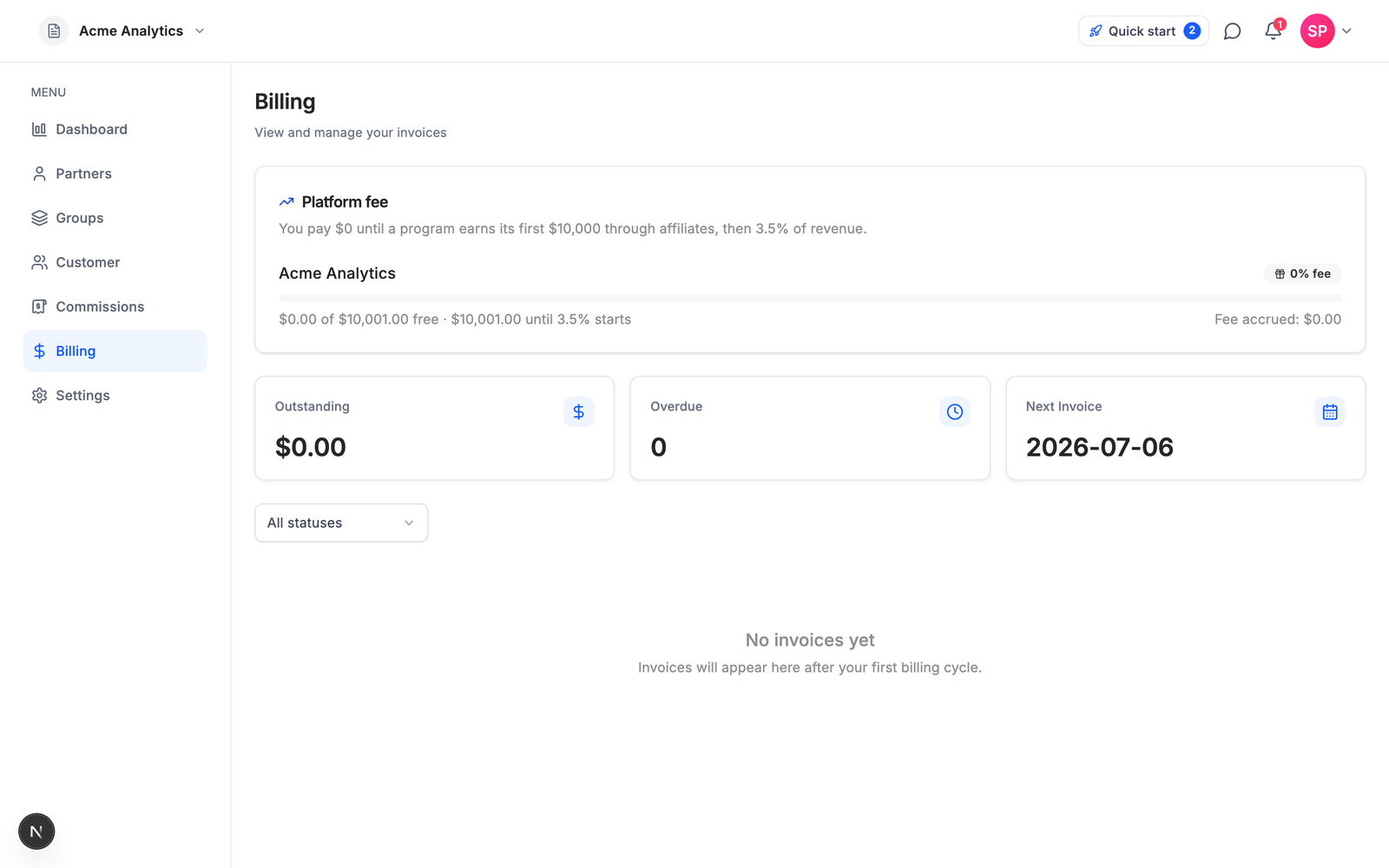
Affitor has no subscription. A program pays nothing until it has made $10,000 through affiliates; after that, 3.5% of affiliate-driven sales is the whole price, and partner payouts by bank or Wise carry no extra fee for you.
How to set up Stripe affiliate tracking on Affitor
Four steps, and the last one tests the chain before a partner sends real traffic. Affitor attributes each customer to the partner whose click first brought them in, within the attribution window you set.
Step 1: Create your program and set the commission
Create a program at affitor.com/welcome, or from your project root:
npx affitor login
npx affitor init --no-wizard
init creates the program and writes its API key to .affitor/.env, which it adds to .gitignore. The --no-wizard flag keeps it from editing your project; you add the tracker by hand in Step 3. Then open the program in the dashboard and set the commission on its Default partner group: that is the rate partners are paid on every sale, and the test in Step 4 needs it. The CLI commands reference lists every flag.
Step 2: Connect Stripe
In your program's settings, click Connect Stripe and approve the Stripe Connect authorization. From then on Affitor receives your checkout, invoice, refund and dispute events.
Affitor matches each sale to a partner using the click ID, the email captured at signup, the Stripe customer ID or your own customer key, whichever it finds. To make the match reliable, pass your user ID and program ID as metadata on the Checkout Session:
// clickId comes from the affitor_click_id cookie.
// customer_key is your internal user ID: send the SAME value you send at signup.
const session = await stripe.checkout.sessions.create({
  line_items: [{ price: 'price_xxx', quantity: 1 }],
  mode: 'subscription',
  success_url: 'https://yoursite.com/success',
  cancel_url: 'https://yoursite.com/cancel',
  metadata: {
    affitor_click_id: clickId,
    affitor_customer_key: currentUser.id,
    program_id: 'YOUR_PROGRAM_ID',
  },
  // Repeat the values here so renewal invoices stay attributed.
  subscription_data: {
    metadata: {
      affitor_click_id: clickId,
      affitor_customer_key: currentUser.id,
      program_id: 'YOUR_PROGRAM_ID',
    },
  },
});
Prefer not to connect Stripe? Report each sale from your own Stripe webhook handler with POST /api/v1/track/sale instead, as the payment tracking docs show. Use one path, not both.
Step 3: Add click and signup tracking
Add the tracker to every page where partner traffic can land. It reads the ?aff= parameter and stores the click in a first-party cookie:
<script src="https://api.affitor.com/js/affitor-tracker.js"
  data-affitor-program-id="YOUR_PROGRAM_ID">
</script>
When a signup succeeds, tell Affitor who signed up, using the same customer key you put in the Stripe metadata:
window.affitor.signup(currentUser.id, currentUser.email);Add both by hand. Replace YOUR_PROGRAM_ID with your real program ID, which the dashboard shows (and .affitor/config.json holds if you used init). The tracking overview explains how the pieces fit.
Step 4: Run a test click, signup and sale
Run the test from your project root. It uses the API key from .affitor/.env, or pass one with --api-key. The --json flag keeps it from editing any of your files:
npx affitor onboard --jsonIt fires a synthetic click, signup and sale through Affitor's attribution pipeline, then polls the program's readiness and prints a summary:
{
  "program_id": "430",
  "steps": [
    { "step": "detect", "status": "ok", "detail": "framework=next-app, provider=stripe" },
    { "step": "browser_tracking", "status": "skipped", "detail": "json mode" },
    { "step": "server_sale", "status": "manual", "detail": "json mode (no auto-edit)" },
    { "step": "env_key", "status": "manual", "detail": ".env: json mode (no auto-edit)" }
  ],
  "integration_verified": true
}
integration_verified: true means the program passed its readiness checks: profile, commission, tracking, and a live event. A real click or sale on the program can also satisfy those checks, so true on its own does not prove the test sale was attributed. Check the test chain directly in the readiness response. The CLI reads the key from .affitor/.env on its own, but your shell does not, so load it first (if you created the program in the dashboard or passed --api-key, set AFFITOR_API_KEY to that program API key instead):
export AFFITOR_API_KEY="$(grep '^AFFITOR_API_KEY=' .affitor/.env | cut -d= -f2-)"
curl -s https://api.affitor.com/api/v1/programs/me/readiness \
  -H "Authorization: Bearer $AFFITOR_API_KEY"
gates.live.test_chain.sale should read "attributed". If the summary says false, blocker and next_action name the first check to fix. Fix it and run the test again until the sale step reads attributed. The test rows are flagged as tests: no partner earns from them, they create no platform fee, and they stay out of your revenue numbers. You can run the test 10 times per program per hour.
The synthetic chain runs inside Affitor. It does not go through your site's signup call or Stripe's webhook delivery to your account, so it cannot prove those two pieces work.
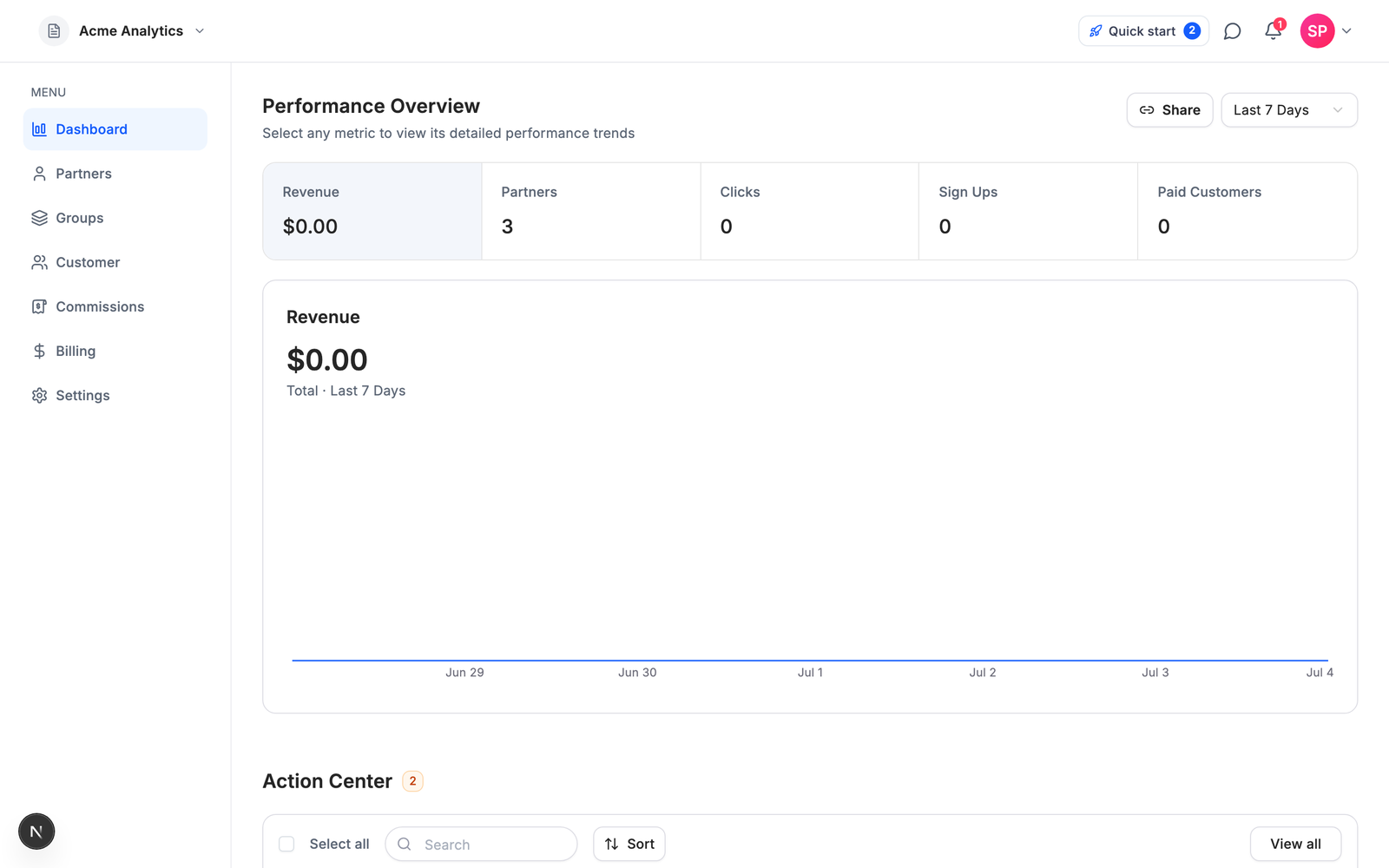
When the test sale reads attributed, click Go live on your program's Share Program page. The program becomes active and gets its marketplace listing. Before you invite partners at scale, have one partner send a real click and make one real purchase through their link, then check that the sale and its commission show up in your dashboard. The CLI quickstart covers the same commands.
FAQ
What is the best affiliate tracking software for Stripe?
It depends on how you want to pay. As of October 12, 2026: Affitor is $0 until a program earns $10,000 through affiliates, then 3.5% of affiliate-driven sales; PromoteKit is $29 a month for up to $10,000 a month in affiliate revenue; Rewardful, a Premier Stripe Partner, is $49 a month for up to $7,500; FirstPromoter, also $49 a month, adds Paddle, Chargebee, Recurly and Braintree.
Does Stripe have a built-in affiliate program?
No. Stripe has no native affiliate feature: no referral links, no partner accounts, no commission calculation and no affiliate dashboard. Affiliate tracking for Stripe is a separate tool that connects to your Stripe account, through a Stripe App or an OAuth connection, and reads your payments from there.
How much does Stripe affiliate software cost?
Entry prices checked on October 12, 2026: Affitor $0 until a program earns $10,000 through affiliates, then 3.5% of affiliate-driven sales; PromoteKit $29 a month after your first 3 referrals; Endorsely $0 while affiliate revenue stays under $1,000 a month, then $39 a month; Rewardful and FirstPromoter $49 a month; Partnero $59 a month; Tolt $69 a month; Trackdesk $299 a month billed yearly. Check each vendor's pricing page before you commit.
Which Stripe affiliate tools can you start without paying?
As of October 12, 2026, three of the eight tools compared here have a no-cost start: Affitor charges nothing until a program earns $10,000 through affiliates (all-time, per program), Endorsely charges nothing while affiliate revenue stays under $1,000 a month, and PromoteKit covers your first 3 referrals. Rewardful, FirstPromoter, Tolt and Trackdesk offer 14-day trials, and Partnero offers 30 days.
How do I test Stripe affiliate tracking before launch?
On Affitor, run npx affitor onboard --json from your project root. It fires a synthetic click, signup and sale through Affitor's attribution pipeline without editing your files. Then read the program's readiness and check that gates.live.test_chain.sale says attributed, because integration_verified: true can also come from real traffic. The test does not go through your own signup call or Stripe's webhook delivery, so make one real purchase through a partner link before you invite partners at scale. Test rows are flagged as tests, and you can run the test 10 times per program per hour.
Can affiliate tracking work without cookies?
Partly. Coupon and promo-code tracking needs no cookie, and PromoteKit, Endorsely, Rewardful, FirstPromoter, Tolt, Partnero and Trackdesk offer it; Affitor does not, as of October 12, 2026. Affitor shortens the time the cookie matters instead: it ties the click to the person at signup, so a cookie cleared after signup does not lose the sale.
What's next
Create your program on Affitor. It costs $0 until a program earns $10,000 through affiliates, then 3.5% of affiliate-driven sales. If you are still deciding on commission rates, hold periods and how to recruit your first partners, how to start a SaaS affiliate program covers everything beyond the software.